Free haulage invoice template for UK hauliers
Download the free template (CSV)
What a UK haulage invoice must include
GOV.UK lists what every invoice must include. In plain English:
- A unique invoice number. Number them in order (INV-0001, INV-0002 and so on) and never reuse one.
- Your name or company name, address and contact details. A limited company uses its full registered name. A sole trader using a business name also gives their own name and an address for legal documents.
- The customer's company name and address.
- A clear description of what you're charging for. For haulage that means each load, which is why the template has one row per ticket.
- The supply date (the day the load was delivered) and the invoice date.
- The amounts charged, VAT if it applies, and the total owed.
If you and your customer are both VAT registered, you need a VAT invoice, which asks for more. HMRC's VAT Notice 700, section 16.3 lists it, including your VAT registration number, the time of supply (tax point), the quantity and unit price for each line, the VAT rate and the total VAT in sterling. The template has a VAT number field and a VAT rate cell for this. Leave them blank or at 0% if you're not VAT registered.
The columns in the template, and why each one is there
| Column | Why it's there |
|---|---|
| Delivery date | The supply date for that load, which GOV.UK asks for. |
| Ticket number | The number on the delivery or weighbridge ticket. It's how your customer checks the line against their own records. |
| Truck reg | Which truck did the load, so a query goes to the right driver. |
| Collected from, delivered to, material | The description of the job: plant or quarry, site and what was carried. |
| Tonnes and rate per tonne | The load amount is worked out for you. If you charge per load, put 1 in tonnes and the load price in the rate. |
| Time on site, free waiting, waiting rate | The waiting charge is worked out from time on site minus the free minutes, at your hourly rate. |
| Return load tonnes and rate | Material carried back from site, charged on its own so it's easy to see. |
| Line total | Load, waiting and return added up for that ticket. |
At the bottom are the subtotal, a VAT rate cell, the VAT amount and the total due, then a box for your payment details.
How to fill in the template, step by step
- Open the file in Excel, Google Sheets or LibreOffice and save it as a spreadsheet so the sums keep working.
- Fill in the top section: your details, the customer's, your payment terms and the next invoice number in your series.
- Delete the three example rows. They use made-up values to show how the sums work.
- Add one row per ticket for the period you're billing, with the ticket number exactly as it's printed.
- Add waiting and returns from the ticket: time on site, the free minutes your customer allows, and any return tonnes. Where waiting is paid from the first minute, set free waiting to 0.
- Check every ticket is on it. Count the tickets for the week and the rows on the invoice. They should be the same.
- Save it as a PDF and send it. Keep a copy with the ticket photos, so you can answer a query in one go.
Worked example: one truck, three loads
This is an example with made-up round numbers, not a real customer, truck, ticket or rate.
| Ticket | What's charged | Line total |
|---|---|---|
| EXAMPLE-001 | Load: 20 t at £5.00 = £100.00 Waiting: 75 mins on site, 30 free, so 45 mins at £40 an hour = £30.00 Return: none | £130.00 |
| EXAMPLE-002 | Load: 20 t at £5.00 = £100.00 Waiting: 25 mins on site, within the free 30 Return: 8 t at £3.00 = £24.00 | £124.00 |
| EXAMPLE-003 | Load: 19.5 t at £5.00 = £97.50 Waiting: 30 mins on site, within the free 30 Return: none | £97.50 |
Subtotal £351.50. Because each line carries its ticket number, the customer can tick it off against their own tickets, and the waiting charge on EXAMPLE-001 shows exactly how it was worked out.
Waiting time and return loads: the lines most often left off
The delivery is easy to remember. The extras are not. Waiting time, return loads and extra miles only get paid if someone puts them on the invoice, and the evidence is usually on the ticket: time on site, a CH or chute note, or a return load noted on it. That's why the template keeps them on the same row as the load. Our guide to waiting time, return loads and extra miles covers how each one is usually charged, and what to check on a weighbridge ticket covers the details worth capturing.
If a job is cancelled at the plant or you're turned away at site, there's no ticket at all. Add it as its own line with the date and what happened. See how to charge for abortive loads.
If your customer self-bills you
Many UK aggregate and tarmac customers pay hauliers on a self-bill, which means they raise the invoice for you. You don't send your own invoice for those loads. HMRC's self-billing guidance (VAT Notice 700/62) sets out how the agreement works. You can still use the template as a checklist: list your tickets for the week and compare them line by line with the self-bill. Read self-billing for hauliers explained for what to check.
Payment terms
Put your payment terms on every invoice. GOV.UK's page on late commercial payments says that if you agree a payment date, it must usually be within 60 days for business transactions, and if you don't agree one, payment is late 30 days after the customer gets the invoice or after you provide the service, if that's later. The same page explains the interest and debt recovery costs you can claim.
When a template stops being enough
For one or two trucks, a template and a folder of ticket photos is fine. It gets harder as the tickets add up: dozens a week per truck, each one typed in by hand, then checked again when the customer queries a line.
That's the job Raahi Flow does. Drivers snap each ticket on their phone, and the app reads the ticket number from the photo. On a delivery ticket it also picks up the date, time on site, any waiting note, return load and tonnes. You can create customer invoices in the app, print any invoice or save it as a PDF from your browser, mark invoices paid, and see which are awaiting payment and which are overdue. If a customer self-bills you, upload the self-bill as a photo or PDF and each line is matched to the driver's ticket by number, with waiting time and return loads compared too. See how ticket to invoice matching works, or read about our haulage invoicing software.
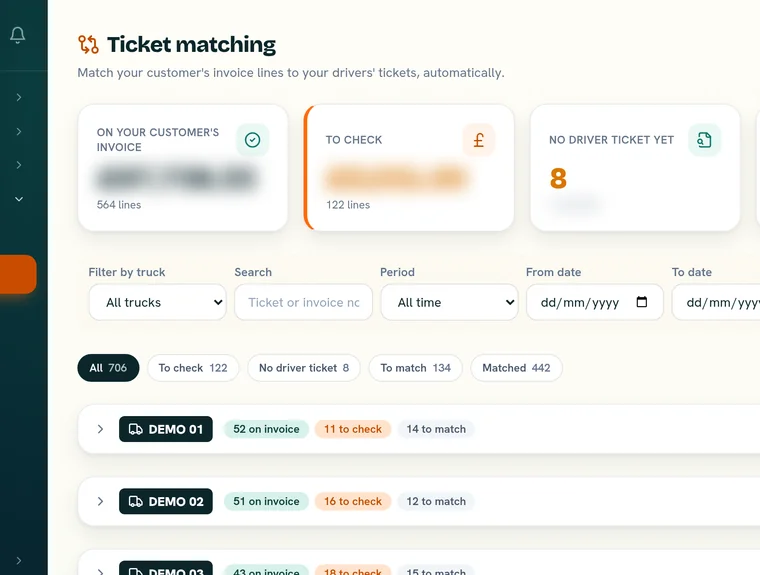
Raahi Flow matched £8,745 of tickets to invoices on one truck.
One honest limit: Raahi Flow doesn't import tickets or invoices from a spreadsheet or CSV file yet, so this template won't upload into the app. Tickets come from the driver's photos, and invoices from a photo or PDF.
Raahi Flow has a 30-day free trial on up to 3 trucks with no card needed, then £20 per truck per month, no VAT. See Raahi Flow pricing.
See your tickets on the invoice, not in a carrier bag
Book a short demo and we'll show you one week of tickets matched to the invoice.
Book a demo →Questions about haulage invoice templates
Is there a free haulage invoice template?
Yes. Raahi Flow's free haulage invoice template is a CSV file that opens in Excel, Google Sheets or LibreOffice. It has one row per ticket with columns for the delivery date, ticket number, truck, tonnes, rate, waiting time and return loads, and it works out each line and the total for you.
What should a haulage invoice include?
GOV.UK says an invoice must show a unique invoice number, your name and contact details, the customer's name and address, a clear description of what you are charging for, the supply date, the invoice date, the amounts, VAT if applicable and the total owed. For haulage, list each load on its own line with its ticket number so the customer can check it quickly.
Should waiting time be on its own line?
It's clearer if it is. Put the time on site, the free minutes and the hourly rate next to each load, so the customer can see how the waiting charge was worked out and match it to the ticket.
Do I need to add VAT to a haulage invoice?
Only if you're VAT registered. GOV.UK says you must use VAT invoices if you and your customer are VAT registered, and a VAT invoice needs extra details such as your VAT number and the VAT rate and amount. Check with your accountant if you're not sure.
Can I upload this template into Raahi Flow?
Not yet. Raahi Flow doesn't import tickets or invoices from a spreadsheet or CSV file. Tickets come from your drivers' photos, and invoices are added as a photo or PDF.
Sources: GOV.UK, Invoices: what they must include; HMRC, VAT guide (VAT Notice 700), section 16.3 Information required on a VAT invoice; HMRC, Self-billing (VAT Notice 700/62); GOV.UK, Late commercial payments: charging interest and debt recovery. All checked 27 October 2026. This guide and the template are general information, not tax or legal advice. Check anything you're unsure about with your accountant.