Haulage invoicing software for UK tipper and aggregate hauliers
A haulier gets paid when the customer agrees the invoice. Every load that isn't on the invoice, or has the wrong waiting time on its line, turns into a query, and a query holds the payment up. Raahi Flow is haulage invoicing software built inside a working UK tipper operation. Drivers snap each ticket on their phone, AI reads every invoice or self-bill, and each load is checked against its ticket before the week is signed off. Raahi Flow matched £8,745 of tickets to invoices on one truck.
Haulage invoicing software, in short: an app that keeps every load, ticket and invoice line in one place so the office can bill the right loads and settle queries fast. With Raahi Flow, AI reads ticket photos and invoice photos or PDFs, each ticket is matched to its invoice line by ticket number, and one screen per truck shows which loads match and which need a look, including delivered tickets that aren't on an invoice yet. You can also create customer invoices and mark invoices paid. Try it free for 30 days on up to 3 trucks, no card needed.
Why haulage invoices get paid late
On tipper and aggregate work the invoice is built from tickets: one ticket per load, often dozens a week per truck. Whether you raise the invoice yourself or the customer sends you a self-bill, payment slows down for the same few reasons:
- A load isn't on the invoice yet. The driver delivered it, but the ticket never reached the person doing the invoice, so it waits for next week or gets forgotten.
- The waiting time or return load is different. The ticket shows a longer time on site, or a return, and the invoice line doesn't.
- Nobody can find the ticket. The customer asks to see it and the paper ticket is in a cab or a carrier bag.
- The office checks by hand. Ticking off 40 lines against 40 bits of paper takes hours, so it gets done late or not every week.
Good haulage invoicing software fixes the checking, not just the typing. That's where Raahi Flow is different from a plain invoice template. If a template is all you need for now, use our free haulage invoice template with ticket, waiting and return columns.
How Raahi Flow handles haulage invoicing
- The driver snaps the ticket at the tip. One photo per delivery or weighbridge ticket, saved against that load and truck as the work happens.
- AI reads the ticket. The app reads the ticket number from the photo. On a delivery ticket it also picks up the date, time on site, any waiting note, return load and tonnes.
- You add the invoice or self-bill. Upload a photo or a PDF, and AI reads every line: ticket number, date, quantity, price and amount.
- Every ticket is matched by number. Each invoice line is matched to the driver's ticket with the same number. Spaces and capital letters don't matter. Waiting time and return amounts are compared too.
- You see one screen per truck. It shows which loads match and which need a look. Filter by truck or dates, and search for any ticket or invoice number.
- You settle the few that need a look. Open the ticket photo, correct a line that was read wrong, or send the ticket photo to your customer as evidence.
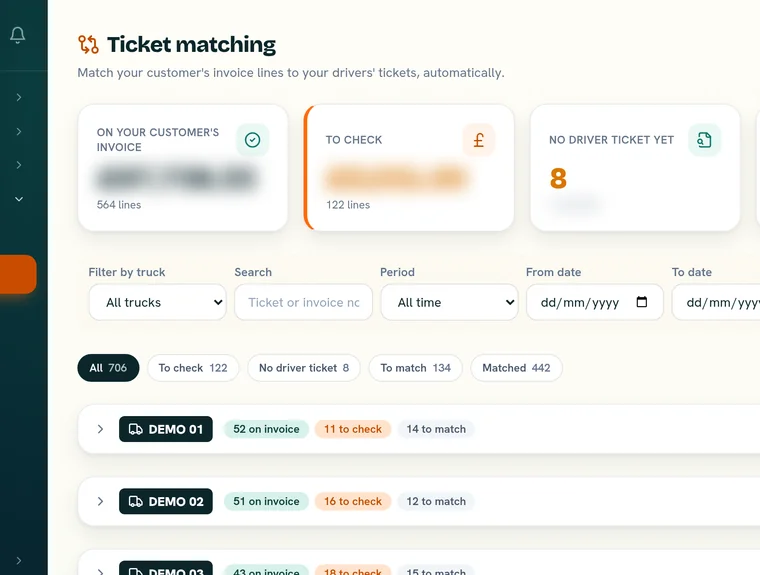
What the office sees before the invoice goes out
- Matched: the ticket and the invoice line agree, so there's nothing to do.
- Delivered, not on an invoice yet: a ticket your driver snapped with no matching line, and how long it has been waiting. These are the loads to add to the next invoice or raise with the customer.
- On the invoice, no driver ticket: Raahi Flow shows which truck it was on and who drove that truck that day, so you know who to ask.
- Different amounts: the waiting time or return load on the ticket doesn't agree with the invoice line.
For a full walk through the matching screen, see ticket to invoice matching.
Your own invoices or the customer's self-bill
Many UK aggregate and tarmac customers pay hauliers on a weekly self-bill, which means the customer writes the invoice for you. Others expect you to raise your own. Raahi Flow works both ways. Upload the self-bill and every line is checked against your tickets. If you invoice the customer yourself, you can create customer invoices and upload supplier bills in Raahi Flow, mark them paid, and keep every record searchable in one place. The Invoices screen shows which invoices are awaiting payment and which are overdue, and you can print any invoice or save it as a PDF from your browser. New to self-bills? Read self-billing for hauliers explained. Agreeing a rate with a new customer? Work out your own cost first with our guide to haulage rates per mile.
Worked example: one tipper, one week of invoicing
This is an example with made-up round numbers, not a real customer, truck or tickets.
Say truck AB00 CDE does 7 loads a day, Monday to Friday. That's 35 tickets snapped by the driver. The following week the customer's self-bill arrives with 33 lines.
| What Raahi Flow shows | Loads | What the office does |
|---|---|---|
| Ticket and invoice line agree | 30 | Nothing |
| Matched, but the waiting time is different | 2 | Send the ticket photo showing time on site |
| Matched, but the return load is different | 1 | Check the return on the ticket photo |
| Delivered, not on an invoice yet | 2 | Raise them with the customer, with the ticket photos |
So the office looks at 5 loads instead of 33 lines, and every query goes to the customer with its ticket photo the same week.
Check this week's invoices against your tickets
Start the free trial on up to 3 trucks, or book a demo and we'll run one of your weeks through it.
Book a demoGetting your invoice data out
If you have your own software or a developer, the Raahi Flow API is read-only and lets your company read its own invoices, tickets, runs and trucks. See the API docs. One honest limit: Raahi Flow doesn't import tickets or invoices from a spreadsheet or CSV file yet. Tickets come from the driver's photos, and invoices from a photo or PDF. There's no Sage or QuickBooks link either: see our Mandata alternative page for a system that has one.
Part of the whole tipper operation
Invoicing works best when the tickets are captured in the same app as the loads. Raahi Flow also runs daily dispatch, waiting time, return loads, DVSA walkaround checks and compliance reminders. See our tipper lorry software, or bulk tipper software for aggregate hauliers if most of your work is per tonne. Waiting time is the line most worth checking, so read our guide to waiting time, return loads and extra miles.
What Raahi Flow costs
Start with a 30-day free trial on up to 3 trucks, no card needed. Then it's £20 per truck per month, no VAT, for any number of trucks. There are no per-user fees: you pay only for the trucks you run. See Raahi Flow pricing.
Questions about haulage invoicing software
What is haulage invoicing software?
It keeps every load, ticket and invoice line in one place, so a haulier can bill the right loads and settle customer queries quickly. Raahi Flow does this for tipper and aggregate work: drivers snap each ticket, AI reads the invoice or self-bill, and each ticket is matched to its invoice line by ticket number.
Does Raahi Flow create invoices or check them?
Both. You can create customer invoices and upload supplier bills, mark them paid and search them in one place. Raahi Flow also checks every invoice or self-bill you upload against your drivers' tickets and shows which loads match and which need a look.
Does it work with customer self-bills?
Yes. Upload the self-bill as a photo or PDF and AI reads each line, then each line is matched to your driver's ticket with the same number. Waiting time and return loads are compared too.
How does it help me get paid on time?
Payment slows down when the customer queries a line or a load isn't on the invoice. Raahi Flow shows delivered tickets that aren't on an invoice yet, and how long they have been waiting, and lets you send the ticket photo to the customer as evidence, so queries are settled the same week.
Can I import tickets or invoices from a spreadsheet?
Not yet. Tickets come from the photos your drivers take on their phones, and invoices are added as a photo or PDF.
Can my own software read the invoice data?
Yes. Raahi Flow has a read-only API for your company's own invoices, tickets, runs and trucks. The docs are on the developers page.
How much does haulage invoicing software cost with Raahi Flow?
Raahi Flow has a 30-day free trial on up to 3 trucks with no card needed, then £20 per truck per month, no VAT, for any number of trucks. There are no per-user fees.
Do drivers need to download an app?
No app store needed. Raahi Flow installs like an app on Android and iPhone from the browser (a PWA) and works on any smartphone, in English, Urdu, Polish, Punjabi, Romanian or Lithuanian.
Every load on the invoice, every query with its ticket
Built by tipper people, for tipper people. Try it on your own trucks for 30 days, no card needed.
Book a demo