Transport management software for small business: do you need a TMS?
Most transport software is sold to big fleets with planners, a back office and an IT budget. If you run two, five or fifteen trucks, you need to know if a TMS is worth it at all, what it should do for a firm your size, and what to ask before you sign. That's what this guide covers. It's written for UK hauliers, with a focus on tipper, grab and muck-away work, because that's where we come from.
What is transport management software?
A transport management system (TMS) is the software a haulage firm uses to run the work. In plain terms it takes a job in, gets it to the right truck and driver, records what happened, and turns that into an invoice. The classic TMS was built for planners moving freight across big networks. For a small firm the useful part is simpler: one place for the day's jobs, the drivers, the paperwork and the money.
Small firm tools often add the vehicle side as well, such as daily walkaround checks, defects and reminders for MOTs and inspections. That part is usually called fleet management software. Our fleet management software for small fleets page covers it in more detail.
What a TMS does for a small haulage firm
- Jobs and orders: who the customer is, where it's from, where it's going, and the rate.
- Dispatch: which driver and truck do which load, sent to the driver's phone instead of a phone call or a WhatsApp message.
- Proof of each load: a delivery note, weighbridge ticket or photo, captured by the driver at the time.
- Invoicing: the loads that were done become invoice lines, or get checked against the customer's self-bill.
- Compliance: walkaround checks, defects and repairs, and reminders for MOT, PMI, road tax and insurance.
- Reports: what each truck earned and what's still waiting to be invoiced.
You don't need all of this on day one. Most small firms start with the part that hurts most, usually tickets and invoicing or walkaround checks, and add the rest later.
Signs a small business needs a TMS
If two or three of these sound familiar, it's worth looking at software:
- Jobs change during the day and drivers find out by phone call or WhatsApp.
- Tickets and delivery notes sit in cabs, get wet or go missing before invoice day.
- Putting the weekly invoices together takes an evening or a whole day.
- A customer's self-bill arrives and checking it line by line takes hours.
- Walkaround checks are on paper and you'd struggle to find last March's defect sheets.
- MOT, PMI and insurance dates live in someone's head or on a wall calendar.
- You can't easily say which truck made money last month.
You're not alone. A 2026 survey by the Road Haulage Association (RHA) and OneAdvanced found that manual data entry was the biggest day-to-day pain for hauliers (43%), across all fleet sizes. 36% said their transport management system needs a big update, and 91% of hauliers don't yet have fully linked systems. OneAdvanced sells transport software, so take the framing with care, but the pain points will be familiar. We wrote up the full findings in what hauliers asked for in the RHA survey.
TMS, fleet management or a compliance app?
The names overlap, and suppliers use them loosely. This is the rough split:
| Type | Main job | Best for |
|---|---|---|
| Transport management system (TMS) | Jobs, dispatch, proof of load, invoicing | Firms whose pain is planning, paperwork and getting paid |
| Fleet management software | Vehicles: checks, defects, servicing, reminders | Firms whose pain is keeping trucks legal and on the road |
| Walkaround or compliance app | Daily checks and defect reports only | Firms happy with their office system who only want paperless checks |
For a small fleet, the best fit is often one tool that covers the work and the trucks, so drivers only learn one app. If compliance is your main worry, our fleet compliance software guide for small UK hauliers compares the main options.
What the law already asks you to record
Software doesn't change your legal duties, but it should make them easier. These come from GOV.UK and DVSA:
- You need a goods vehicle operator's licence if your business uses goods vehicles above 3,500 kg gross plated weight, with some exceptions. See our operator licence compliance page.
- A walkaround check must be done at least once in every 24-hour period the vehicle is used.
- Defect reports, with the repair, must be kept for at least 15 months.
- If checks are done on a phone or tablet, DVSA's guide says the system must give a suitable digital signature, secure storage, date and time stamps, and confirmation that the vehicle is roadworthy at the start of the journey.
Ask any supplier to show you each of those on a demo. For the full rules see our DVSA daily walkaround check guide and HGV defect reporting procedure.
How transport management software is priced
There's no standard price, so compare the full cost for your own fleet. The common models are:
- Per vehicle: you pay for each truck. Easy to work out, and it grows with your fleet.
- Per user: you pay for each office user or driver. This can add up fast with agency or part-time drivers.
- Plans or tiers: a set price up to a number of vehicles or features.
- Quote only: no price on the website, a demo first, and sometimes setup, training or contract terms on top.
Ask for the full yearly cost for your fleet, including every driver, any setup fee and the notice period. When we checked UK tipper software sites on 2 November 2026, only a few showed prices. See tipper software UK options compared for which ones, and Raahi Flow pricing for cost examples by fleet size.
Questions to ask on a demo
- Can my drivers use it on their own phones, Android and iPhone, without an app store step?
- Does it work in the languages my drivers read best?
- How does a ticket or delivery note get from the driver to the invoice?
- Can it check a customer's self-bill against what my drivers actually did?
- Show me a walkaround check, a defect, the repair and the sign-off.
- Where are records kept, for how long, and can I export them?
- What does it need to work in poor signal, and what happens if there isn't any?
- What's the full yearly cost for my fleet, and what's the notice period?
- Can I run a real week of my own jobs through it before I pay?
Tipper and grab work needs more than a generic TMS
Many TMS products were built for pallets and general freight. Tipper, grab and muck-away work runs differently. Loads change by the hour, money depends on weighbridge tickets, customers often self-bill, and dead mileage and waiting time add up. If that's your work, check the software understands it. Our tipper lorry software page covers what tipper firms need, and bulk tipper software covers per-tonne aggregate work. If you run grabs, our grab lorry sizes, weights and capacity guide is a good place to check payloads.
How Raahi Flow works as a TMS for a small fleet
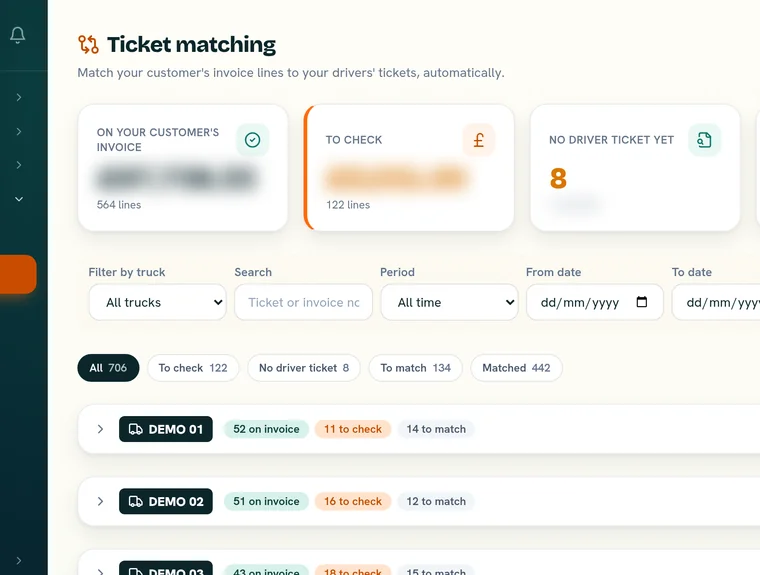
Raahi Flow was built inside a working UK tarmac operation, for tipper and haulage firms from one owner-driver up to a full fleet. The office pastes in the transport plan, Raahi Flow maps every load, and drivers get turn-by-turn directions on their phone. Drivers snap each delivery or weighbridge ticket, and Raahi Flow matches every ticket to the invoice or self-bill line for that load, so you see which loads match and which need a look. Raahi Flow matched £8,745 of tickets to invoices on one truck.
On the compliance side, drivers do the DVSA daily walkaround check in the app and add photos of any defect. Each defect moves through Open, In repair, Repaired and Closed. The office can mark a truck off road (VOR) with a reason. Owners and managers get reminders in the app for things like MOT, PMI, road tax, insurance and driver cards. The app works in six languages: English, Urdu, Polish, Punjabi, Romanian and Lithuanian, and each user picks their own.
To be clear about what it doesn't do: the live map only shows trucks fitted with a hardware tracker, and only office staff see it. Raahi Flow has no customer portal and nothing for subcontractor drivers, and it needs a phone signal or wifi to work. If you need those, a bigger TMS may suit you better. Our Mandata alternative for small tipper fleets page sets out where a full TMS does more.
Try it on your own trucks
Book a short demo and we'll run a day of your jobs, tickets and checks through it. There's a 30-day free trial on up to 3 trucks, no card needed, then £20 per truck per month, no VAT, with no per-user fees.
Book a demo →Questions about transport management software for small business
What is transport management software?
Transport management software, or a TMS, is the system a haulage firm uses to run its jobs from start to finish: taking the order, planning which truck and driver does it, sending the job to the driver, recording what happened on the day and turning that into an invoice. Many also hold walkaround checks, defects and vehicle reminders, so the office isn't working from paper, spreadsheets and WhatsApp.
Does a small haulage business need a TMS?
Not always. If you run one or two trucks for one customer and the paperwork takes an hour a week, a notebook and a spreadsheet may be fine. It starts to pay when jobs change every day, tickets or delivery notes go missing, invoices take days to put together, or you can't quickly show DVSA your walkaround and defect records.
What is the difference between a TMS and fleet management software?
Fleet management software looks after the vehicles: checks, defects, servicing, MOTs and reminders. A TMS looks after the work: jobs, dispatch, proof of each load and invoicing. Small firms often want both in one place, so many tools for small fleets now do some of each.
How much does transport management software cost for a small business?
It depends on how it's priced. Some suppliers charge per vehicle, some per user, some by plan, and some only quote after a demo, sometimes with setup or training fees. Ask for the full yearly cost for your fleet size, including drivers, and the notice period. Raahi Flow is £20 per truck per month after a 30-day free trial on up to 3 trucks, with no card needed and no per-user fees.
Can transport management software help with DVSA compliance?
It can make the records easier to keep and find, but it doesn't make you compliant on its own. DVSA's guide says a digital walkaround system must give a suitable digital signature, secure storage, date and time stamps and confirmation that the vehicle is roadworthy at the start of the journey. Defect records must be kept for at least 15 months. You still need a written procedure and people who follow it.
Can I try transport management software before I pay?
Many suppliers offer a demo and some offer a free trial. Run a real week of your own jobs through it, with your own drivers, before you sign anything. Raahi Flow has a 30-day free trial on up to 3 trucks, no card needed.
Sources, all checked 9 November 2026: RHA, New research from the RHA and OneAdvanced (23 July 2026); GOV.UK, Being a goods vehicle operator; DVSA, Carry out HGV daily walkaround checks; DVSA, Guide to maintaining roadworthiness. General information, not legal advice.